Sample trips
See a Planytera itinerary in action.
Here's an example of what Planytera builds for you. A full day with stops, timings, maps, and cost estimates. Below, see what each button on the card does.
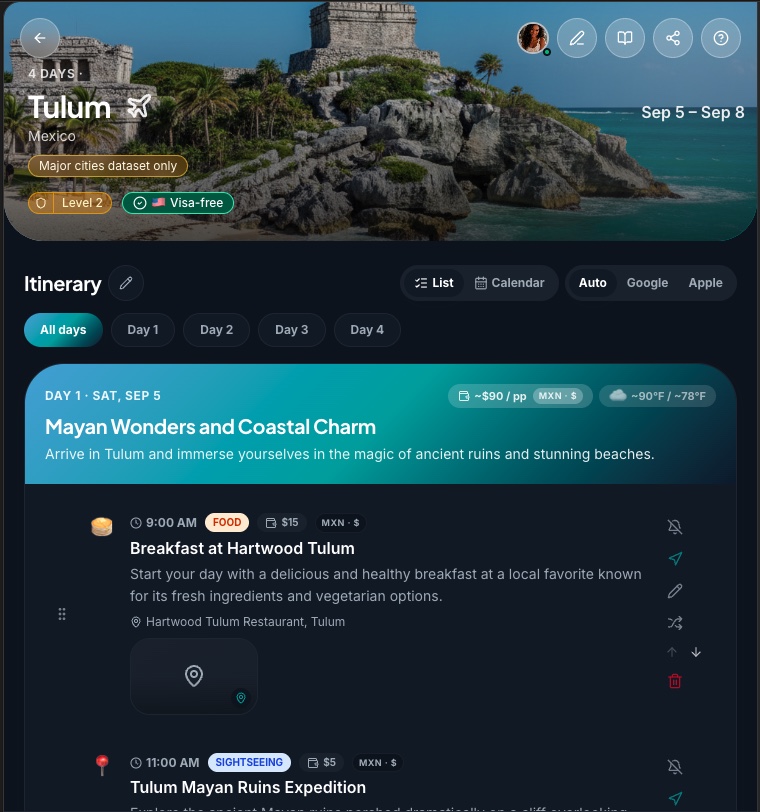
A day plan generated by AI. Exactly the kind of card Planytera builds for every trip.
What's on the card
Every button, explained.
Itinerary cards in Planytera are interactive. Here's what each button and feature does so you know exactly what to expect.
Map preview
Tap the map pin for a zoomed-out view of the stop. Great for spotting clusters and planning walking routes.
Timing & pace
Every stop has a start time so your day flows from morning to night without overlaps or dead time.
Cost estimates
Every paid activity includes a per-person estimated cost in the destination's local currency, so you can budget before you go.
Swap a stop
Not sold on a place? Tap Swap and Planytera finds a comparable alternative in the same time slot and category.
Edit everything
Change the time, location, notes, or estimated cost of any activity directly in the app.
Travel advisory
U.S. State Department travel advisory levels are shown inline so you can gauge destination risk at a glance.
Exportable trips
Download your itinerary as a PDF or share a live link with your travel companions.
Invite collaborators
Share your trip with friends or teammates. Viewers can vote on activities; editors can make changes.
Day navigator
Jump between days with a single tap using the sticky day nav at the top of every itinerary.
City match
Planytera auto-detects your destination city and fills map searches with the right context.
Activity notifications
Get a reminder before each activity so you never run late for a reservation.
Open in Maps
Tap Navigate on any stop to open turn-by-turn directions in Apple Maps, Google Maps, or Waze.
Search flights
Tap the plane by your destination to search flights there. The search opens in your browser so you can compare and book.
Trip journal
Keep a day-by-day travel journal inside your trip. Jot notes and memories as you go, then export or share the whole thing.
Split costs
Invite your travel companions, log shared expenses, and see who owes what. Planytera does the math and settles up; it never moves money.
Visa requirements
See at a glance whether your passport needs a visa, an e-visa or travel authorization, or nothing at all. Pick your passport once and it remembers.
Ready to build your own?
Tell Planytera where you're going and what you love. Your first itinerary is ready in moments.